

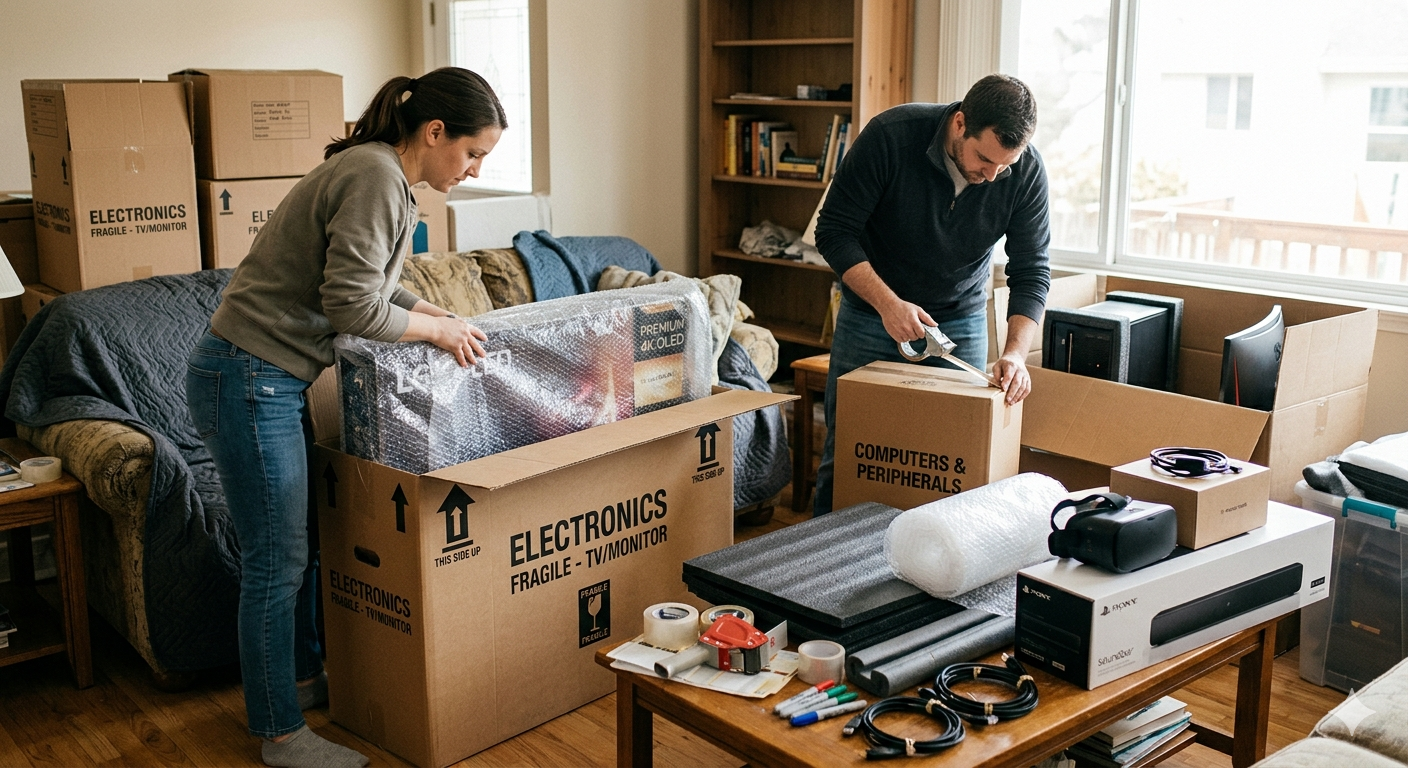
How to Move Expensive Electronics Safely: A Step-by-Step Guide
Moving expensive electronics can be a daunting task. These items are fragile, valuable, and often essential to our daily lives. Whether you’re relocating to a new home or sending a high-end TV, computer, or sound system to another location, proper care is necessary to prevent damage during transit. One wrong move can lead to expensive repairs or replacements, so it’s important to approach the task with caution and preparation.
The first step in any safe move is ensuring that you have the right tools and support. Many people turn to professional moving services, like affordable moving services in Minneapolis, when handling electronics. Professionals can ensure your electronics are packed, moved, and unpacked properly, minimizing the risk of damage. However, if you’re planning a DIY move, there are several steps you can follow to ensure the safe transportation of your valuable items.
Gather the Right Materials
The first thing you’ll need to do is gather the proper materials for packing your electronics. For expensive items, the packaging can make a big difference. Here’s a list of essential materials:
- Original Boxes: If you still have the original boxes for your electronics, use them. They are designed to fit the item perfectly and offer the best protection. They also come with foam inserts or custom padding that helps cushion the item during transport.
- Bubble Wrap: For extra padding, bubble wrap is a must. Wrap your electronics carefully, paying attention to any corners or edges that are vulnerable to impact.
- Packing Peanuts or Foam Inserts: These materials provide cushioning for fragile items. Use them inside the box to fill any gaps and prevent the item from shifting during transit.
- Packing Tape: You’ll need strong packing tape to securely seal the boxes. Use enough tape to ensure the box stays closed during the move.
- Labels: Make sure to label your boxes as fragile. This will help anyone handling the boxes to be more cautious.
- Straps and Moving Blankets: If you don’t have the original box or need extra protection, moving blankets or straps can help secure larger electronics like TVs or stereo systems.
Prepare Electronics for the Move
Before you begin packing your electronics, ensure that each item is properly prepared. For items like computers, televisions, and gaming consoles, it’s essential to disconnect and clean them thoroughly before moving. Here’s what you should do:
- Unplug All Cables: Disconnect all power cables, HDMI cords, and other attachments from your electronics. Bundle these cables neatly, so they don’t get lost or tangled during the move. Using zip ties or cable organizers can help keep them together.
- Back Up Data: If you’re moving a computer or any device that holds valuable data, it’s important to back up everything beforehand. Use an external hard drive or cloud storage to ensure you don’t lose important files.
- Clean the Electronics: Dust and debris can scratch screens or clog vents. Clean your electronics using a soft, lint-free cloth. For TVs or monitors, use a microfiber cloth and avoid using any cleaning liquids directly on the screen.
- Remove Batteries: For any devices powered by batteries, like cameras or remotes, remove the batteries to avoid leakage or damage during the move. Store them in a separate, safe place.
Pack Electronics Carefully
Packing your electronics properly is one of the most important steps in ensuring their safety. If you’re using the original packaging, simply follow the instructions that came with the device. If you don’t have the original box, here’s how to pack your electronics safely:
- Wrap Each Item Individually: Start by wrapping each electronic item in bubble wrap, making sure it’s fully covered. Use multiple layers for added protection, especially around delicate parts like screens or lenses.
- Fill the Box with Padding: Once the electronics are wrapped, place them into a sturdy box. Fill any empty spaces with packing peanuts, foam inserts, or crumpled newspaper to prevent shifting. The more secure the item is inside the box, the less likely it is to get damaged.
- Label the Box: Clearly mark the box as fragile, and specify what’s inside, such as “TV” or “Laptop.” This will help movers handle the box with extra care.
- Seal the Box: Once the box is packed and labeled, securely tape it shut. Double-check that everything is tightly sealed, and that no corners are exposed.
Moving Large Electronics
For larger electronics like TVs or sound systems, you’ll need to take extra precautions. Here are some tips:
- Use Moving Blankets: Wrap the electronics in a moving blanket for extra protection. This will cushion the item and prevent any bumps or scratches during transport.
- Lift Carefully: Moving large electronics requires multiple people. Make sure you have help when lifting heavy items, and avoid dragging the electronics, as this can cause damage.
- Secure During Transport: If you’re using a vehicle, make sure the electronics are strapped down securely to avoid shifting or falling. You can use ratchet straps to hold them in place during the move.
Unpacking and Setting Up
Once you’ve safely transported your electronics, it’s time to unpack. Handle each item gently and carefully. As you set up your electronics, reconnect the cables, place the items in their designated spots, and test everything to ensure it’s working properly.
If you’re feeling overwhelmed by the packing and moving process, or simply want to ensure everything is done with the utmost care, consider hiring professional help. Moving companies offer expert professional packing services in Coon Rapids MN to ensure that all your valuable electronics are packed and moved safely.
Final Thoughts
Moving expensive electronics can be tricky, but with the right preparation, materials, and careful handling, you can protect your valuable items from damage. Whether you’re moving a large TV or a delicate laptop, taking the time to pack properly and follow the necessary precautions will ensure a safe and successful move. If you ever need professional help with your move, there are expert moving and packing services available to guide you through the process and keep your electronics safe.
Related Posts
Trusted iPhone Repair in Putney for All Models
When your phone stops working, it can cause stress. Many people depend on their phones for daily tasks. If your device is broken, finding iPhone repair in Putney becomes very important. A trusted repair service can fix your phone fast and help you stay connected. Electronic Base is known for providing reliable iPhone repair in Putney. The team understands how i

GST Login: Access Your GST Portal Dashboard Online
The Goods and Services Tax System (GST System) in India offers a one-stop solution to the various needs of the taxpayers and businesses, allowing them to perform their tax-related activities under one umbrella and going much beyond simple filing of returns. The GST registration is a secure page where you log in to a personal dashboard to file returns, chec

Elevate Your Brand With Influencer Boxes
Developing custom influencer boxes is a new necessity for brands that want to create an impression that lasts. These custom packaging solutions are an exclusive means of presenting products and making their unpacking process memorable. Bringing in the finest influencers to give them gifts or exclusive launches to their faithful followers, the custom influencer

Streamlining Workplace Transitions with Professional Office Moving Services
Relocating an office can be a complex and time-consuming process, which is why hiring Office Moving Services in Decatur is essential for a smooth transition. Moving office equipment, furniture, and sensitive documents requires careful planning and specialized expertise to minimize downtime and ensure that operations continue efficiently. Office Moving Services
Leave a Reply